

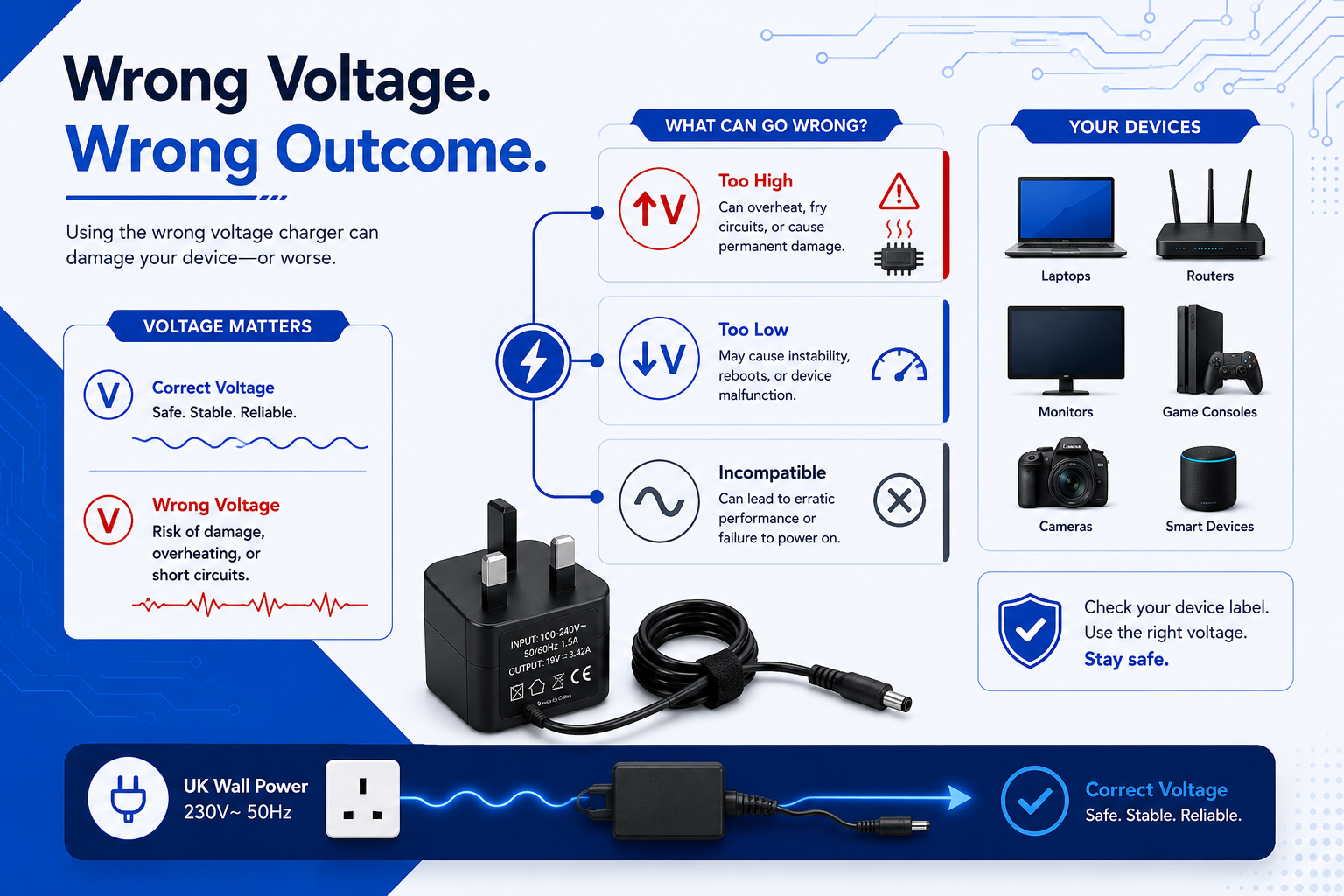
Plugging in a wrong voltage charger is a common mistake when your laptop, router, or camera dies and you cannot find the original plug adapter. You rummage through a drawer full of tangled cables and find an old adapter that fits the charging port perfectly. But before you plug it in, you notice the label reads a different voltage.
Using a charger with the wrong voltage can have immediate and severe consequences for your electronic devices. While modern gadgets have some built-in safeguards, relying on an incorrectly matched power supply can permanently fry internal components, cause batteries to overheat, or render your device completely useless. Ensuring a precise voltage match is crucial for safety, longevity, and performance. In this guide, we break down exactly how electrical mismatches affect your tech and how to safely source a replacement in the UK.
The Dangers of Using a Wrong Voltage Charger (Over-Volting)
Plugging a high-voltage charger into a device designed for lower voltage will cause immediate, irreversible damage to its internal circuitry. The excess electrical pressure bypasses safety thresholds, overheating resistors, melting delicate silicon chips, and potentially triggering an electrical fire. Always match voltages exactly to preserve equipment safety.
Why Over-Volting Ruins Electronics
Voltage can be thought of as electrical pressure. If your device is rated for 12V and you introduce a 19V or 24V power adapter, you are forcing far too much pressure into a delicate ecosystem. The internal voltage regulators will attempt to convert the excess energy into heat. Within seconds, these components exceed their thermal limits, leading to what engineers refer to as Electrical Overstress (EOS).
If you want to understand the exact power draw of a circuit, you can look at the foundational electrical formula:
$$P = V \times I$$
(Where P is Power in Watts, V is Voltage, and I is Current in Amperes).
If the voltage variable ($V$) is artificially increased beyond the manufacturer’s maximum ratings, the resulting power spike destroys the dielectric barriers inside microchips.
Real-World Example
Consider standard consumer audio equipment. If you plug a high-voltage laptop adapter into a smaller piece of equipment—such as a 9V portable radio—the components cannot handle the stress. To avoid instant component destruction for this specific scenario, using an exact certified replacement like the 9V Power Supply for Roberts Classic 993 Radio is essential.
Common Mistakes
- The “If it fits, it sits” myth: Assuming that because a barrel plug physically fits into the charging port, the adapter must be safe to use.
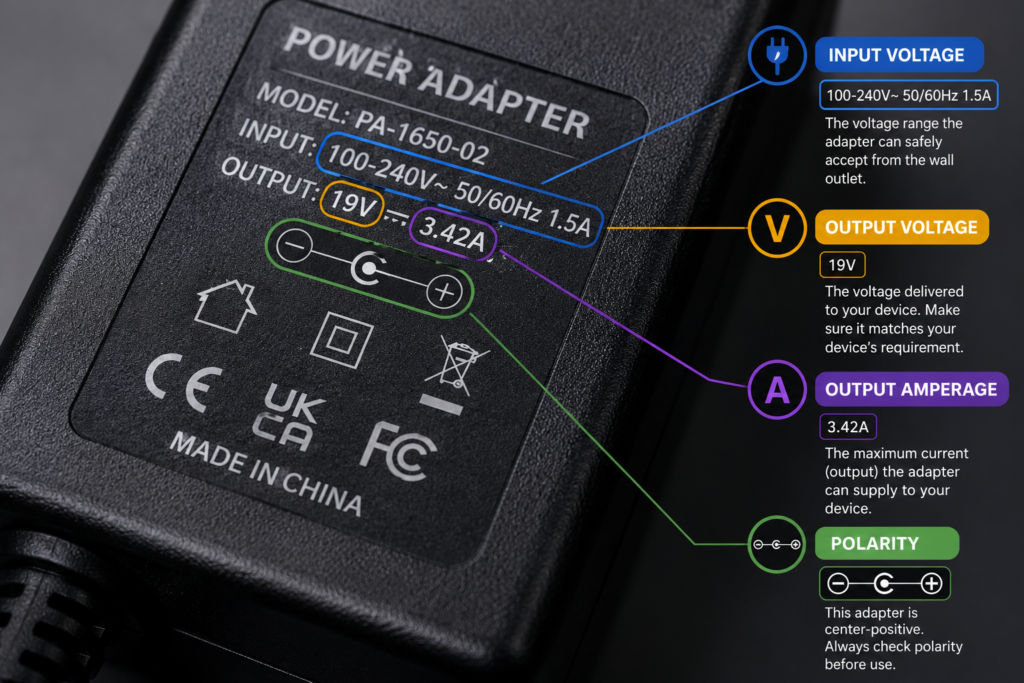
- Ignoring the rating plates: Failing to inspect the input/output text printed on both the device and the replacement brick.
Buying Advice
When looking for a replacement power adapter, never compromise on the voltage rating. Ensure the output voltage on your new adapter perfectly matches the input voltage specified on your device’s rating plate.
Expert Reference: To learn more about performing structural safety checks on your plug blocks and ensuring they meet UK regulations, read the official Electrical Safety First Charger Safety Guide.

What Happens When Voltage is Too Low (Under-Volting)
Using a charger with a lower voltage than your device requires will result in a severe lack of power. The device will either refuse to turn on, behave erratically, or fail to charge the internal battery. While less likely to destroy your hardware instantly than over-volting, under-volting causes long-term damage to batteries and charging circuits.
The Impact on Hardware
When the voltage output of an adapter is too low, it cannot supply enough electrical pressure to overcome the natural resistance of the device’s internal circuits. If a television screen demands 19V but you provide only 12V, the internal power management chip will fluctuate rapidly, drawing uneven amounts of current to compensate. This excessive strain dramatically reduces the lifespan of the device.
Troubleshooting Under-Volted Devices
If your device is plugged in but the battery percentage is actively dropping, or if a screen flickers constantly while plugged into a spare adapter, you are likely using an under-volted or under-powered charger. Unplug it immediately to prevent battery and circuit strain.
Summary
- Action: Source an adapter that meets the exact baseline voltage requirement of your equipment.
- Risk: System instability, component strain, and total charging failure.
Demystifying Voltage vs. Amperage
While voltage must match your device exactly, amperage functions differently. A charger’s amperage rating represents its maximum capacity. It is completely safe to use a charger with a higher amperage than your device requires, but using one with lower amperage will cause the charger block to overheat and fail.
Comparison of Electrical Mismatches
| Scenario | Impact on Device | Risk Level | Common Symptoms |
| Voltage Too High | Melts circuits, fries capacitors | Critical | Smoke, burning smell, instant device death |
| Voltage Too Low | Insufficient power, component strain | Medium | Won’t turn on, flashing lights, slow charge |
| Amperage Too High | Perfectly Safe | Safe | Normal, reliable operation |
| Amperage Too Low | Overheats the charger block | High (Charger Risk) | Charger becomes extremely hot to the touch |
Myth vs. Fact
- Fact: Electronics are “smart”—they only draw the current (amps) they actually need. The charger does not push current; the device pulls it.
- Myth: A 4.74A laptop charger will force too much current into a device that only needs a 2.37A charger, destroying it.
How to Find a Safe, Compatible Replacement Adapter
To find a perfectly safe replacement adapter, identify the exact voltage, minimum amperage, and plug connector type required by your device. Opting for certified, high-quality compatible replacements from UK specialists ensures your equipment remains protected without paying premium manufacturer prices.
Industry Insights: The Value of Smart Alternatives
Many consumers believe they must purchase expensive, original branded replacements to keep their electronics safe. In reality, high-quality third-party replacements built to strict CE and UKCA safety standards offer the exact same electrical performance and reliability.
For instance, if your Android entertainment box power supply fails, choosing a reliable third-party alternative like a 12V Power Adapter for TalkTalk TV Hubs gives you full over-voltage protection at a fraction of the cost. Similarly, heavy-duty electronics like smart televisions require precise regulation. An exact matching 19V AC-DC Adapter for LG Smart TVs prevents display flickering and keeps perfectly functional screens out of landfills.
Safe Compatibility Checklist
Before using any replacement adapter, cross-check these three variables:
- Polarity: The positive and negative symbols on the barrel plug diagram must align perfectly (usually centre-positive).
- Voltage (V): Must be an exact match.
- Amperage (A): Must be equal to or higher than the original device requirements.
FAQs
Can I use a 12V charger on a 5V device?
No. Using a 12V charger on a 5V device delivers more than double the required electrical pressure. This will instantly blow the device’s internal fuses or damage main microchips, causing irreversible failure.
Will a lower voltage charger damage my battery?
Yes, it can. A lower voltage charger will not provide enough power to charge the battery efficiently. This forces the internal battery management system to cycle excessively, causing heat buildup and reducing the overall lifespan of the battery cells.
Is it safe to use a higher amp charger?
Yes. It is entirely safe to use a charger with a higher amperage rating than your original one, provided the voltage is exactly the same. The electronic device only pulls the amount of amps it needs to operate.
What happens if the polarity is wrong?
If you connect an adapter with inverted polarity (e.g., centre-negative into a centre-positive device), you risk short-circuiting the device instantly unless it features built-in reverse-polarity protection circuits.
How can I identify my original charger specifications?
Look for the “Output” rating printed on the label of your old extension lead. It will be listed as something similar to Output: 19V ⎓ 3.42A. If you have lost the old brick, look for the “Input” rating near the physical charging port on the device itself.
Conclusion
When it comes to powering your valued electronics, guessing is never worth the risk. A mismatch in voltage can destroy your hardware in a fraction of a second or cause insidious, long-term degradation.
By matching your voltage exactly and choosing a power adapter with adequate amperage, you protect your gear and ensure safe operation. If you need a replacement plug adapter for a laptop, router, or screen, browse the fully certified, safety-tested selection at Power Adapter Warehouse to find your exact match quickly and affordably.