

Laptop & Computer Chargers are essential lifelines for your everyday devices, and a faulty one can bring your work, studies, or entertainment to a complete, frustrating stop. In today’s digital landscape, where hybrid working, remote learning, and streaming are standard, a dead battery is more than just an inconvenience, it is a major disruption. Whether your original unit has stopped working without warning, been misplaced during a commute, or suffered visible cable damage from daily wear and tear, choosing the right replacement is absolutely vital. The good news is that finding a reliable, safe power adapter does not have to be a complicated or stressful process.
In this comprehensive guide, we will explain exactly how to identify the correct replacement charger for your specific machine, help you understand confusing power specifications, and guide you on how to avoid common compatibility issues. We will also highlight popular, high-quality replacement solutions available directly from Power Adapter Warehouse to help you get back up and running quickly and safely.
Why Choosing the Correct Laptop Charger Matters
Not all Laptop & Computer Chargers are created equal, and assuming they are interchangeable can be a costly mistake. While many units may appear visually similar from the outside, the internal components vary drastically. Using an incompatible power adapter can cause immediate charging problems, frustratingly poor performance, or, in the worst-case scenario, permanent damage to your device’s motherboard and internal battery cells.
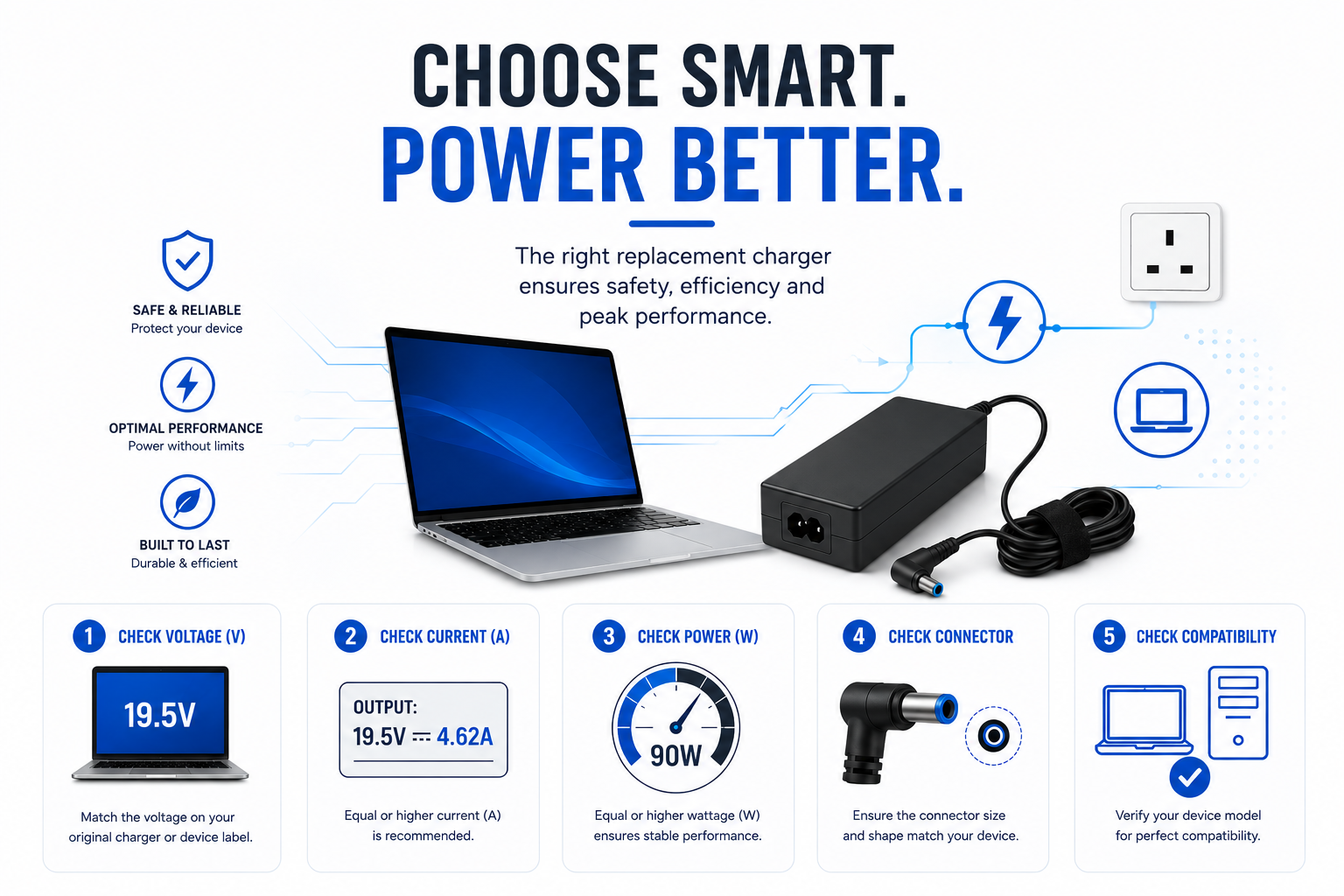
When shopping for a replacement laptop charger, you must always verify the following critical details:
- Output voltage (V): The precise electrical force pushing power into your machine.
- Output current or amperage (A): The volume of electrical current available for your laptop to draw upon.
- Connector size and polarity: The exact physical dimensions of the plug and how the positive/negative charges align.
- Power rating (W): The total power capacity the adapter can safely deliver.
- Device compatibility: Ensuring the charger’s smart chip (if applicable) communicates correctly with your laptop model.
A quality replacement power adapter should provide highly stable power delivery while strictly meeting UK safety standards. At Power Adapter Warehouse, customers can easily browse hundreds of heavily tested, fully compatible charging solutions through the shop page.
Many consumers mistakenly assume they need to purchase an expensive, branded original charger directly from the manufacturer. In reality, a high-quality compatible charger with matching specifications often delivers the exact same reliable performance, longevity, and safety features at a far more affordable price point.

How to Match Voltage, Amps and Wattage
One of the most important aspects of selecting Laptop & Computer Chargers is matching the power specifications correctly. Failing to understand these three metrics is the most common reason consumers purchase the wrong replacement.
Voltage
Voltage must match exactly on your new power adapter. Think of voltage as the water pressure in a pipe; if the pressure is too high, it will burst the pipe.
For example:
- Original charger: 19V
- Replacement charger: 19V
Using a different voltage may damage internal components.
Amperage
Amperage can match or comfortably exceed the original specification. Think of amperage as the volume of water available.
For example:
- Original charger: 3.42A
- Replacement charger: 3.42A or higher
The laptop only draws the power it requires from the compatible charger.
Wattage
Wattage is calculated using:
Voltage × Amperage = Watts
A laptop requiring 65W should ideally use a 65W or higher rated charger.
For additional electrical safety guidance, consumers can review recommendations from:
Understanding these specifications helps ensure safe and reliable charging performance.
Popular Replacement Laptop & Computer Chargers Available
Many customers search for chargers by manufacturer or laptop model. Some of the most commonly requested replacements include:
Lenovo Laptop Chargers
For compatible Lenovo devices, Power Adapter Warehouse offers replacement solutions such as:
- Lenovo IdeaPad 100S
- Lenovo IdeaPad Miix Series
- Lenovo Yoga Series
Recommended product:
Lenovo IdeaPad 100S Compatible Charger
Dell Laptop Chargers
Users of Dell XPS laptops often require USB-C charging solutions.
Recommended product:
Dell XPS 13 & 15 USB-C Charger
ASUS Laptop Chargers
Older ASUS notebook systems frequently require dedicated power adapters.
Recommended product:
ASUS Eee PC Charger Adapter
By selecting a charger designed for your specific model, you reduce the risk of compatibility issues and charging interruptions.
Signs You Need a New Laptop Charger
A charger rarely fails without warning. Watch for these common symptoms:
Physical Damage
- Frayed cable insulation
- Bent connector pins
- Exposed wiring
- Cracked adapter housing
Charging Problems
- Battery not charging consistently
- Charger disconnecting intermittently
- Laptop only charging at certain angles
- Excessive heat from adapter
Electrical Issues
- Buzzing sounds
- Burning smells
- Visible sparks
- Sudden shutdowns
If any of these signs appear, replace the charger immediately rather than continuing to use a potentially unsafe power supply.
Why Buy Replacement Laptop Chargers from Power Adapter Warehouse?
When purchasing replacement power supplies online, reliability matters.
Power Adapter Warehouse specialises in compatible replacement chargers for:
- Laptops
- Tablets
- Monitors
- Routers
- Printers
- Audio equipment
- Consumer electronics
Benefits include:
Extensive Compatibility
The store offers thousands of device-specific power solutions.
Cost Effective Alternative
Customers can often save significantly compared to manufacturer branded replacements.
UK Based Service
Fast ordering and local customer support help simplify the buying process.
According to sustainability guidance from the UK Waste and Resources Action Programme, extending the life of electronics helps reduce electronic waste and supports more sustainable consumption practices.

How to Order the Correct Replacement Charger
Before placing an order:
- Check your laptop model number.
- Verify voltage and amperage requirements.
- Measure the connector if necessary.
- Compare specifications with the replacement product.
- Confirm UK plug compatibility.
If unsure, take a photo of the original charger label and compare the details before purchasing.
This simple process dramatically reduces ordering mistakes and ensures you receive a compatible laptop power adapter.
Frequently Asked Questions
Can I use a charger with higher amperage?
Yes. A laptop only draws the current it requires. The voltage must still match exactly.
Is a compatible replacement charger safe?
A quality compatible charger that matches the required specifications can provide safe and reliable performance.
How do I find my laptop charger voltage?
Check the label on your original charger or the manufacturer specifications for your laptop model.
What happens if I use the wrong voltage?
Using the wrong voltage may damage internal components and should be avoided.
Can USB-C chargers replace traditional laptop chargers?
Many modern laptops support USB-C charging, but compatibility depends on the device and power requirements.
Conclusion
Finding the right laptop chargers does not need to be difficult. By matching voltage, amperage and connector size correctly, you can safely replace a damaged or missing charger while maintaining reliable device performance.
Whether you need a Lenovo charger, Dell USB-C charger, ASUS notebook adapter or another compatible replacement, Power Adapter Warehouse offers a wide range of solutions designed to help you get back online quickly.
Ready to replace your charger? Browse the full collection today and find the compatible power adapter for your device.