

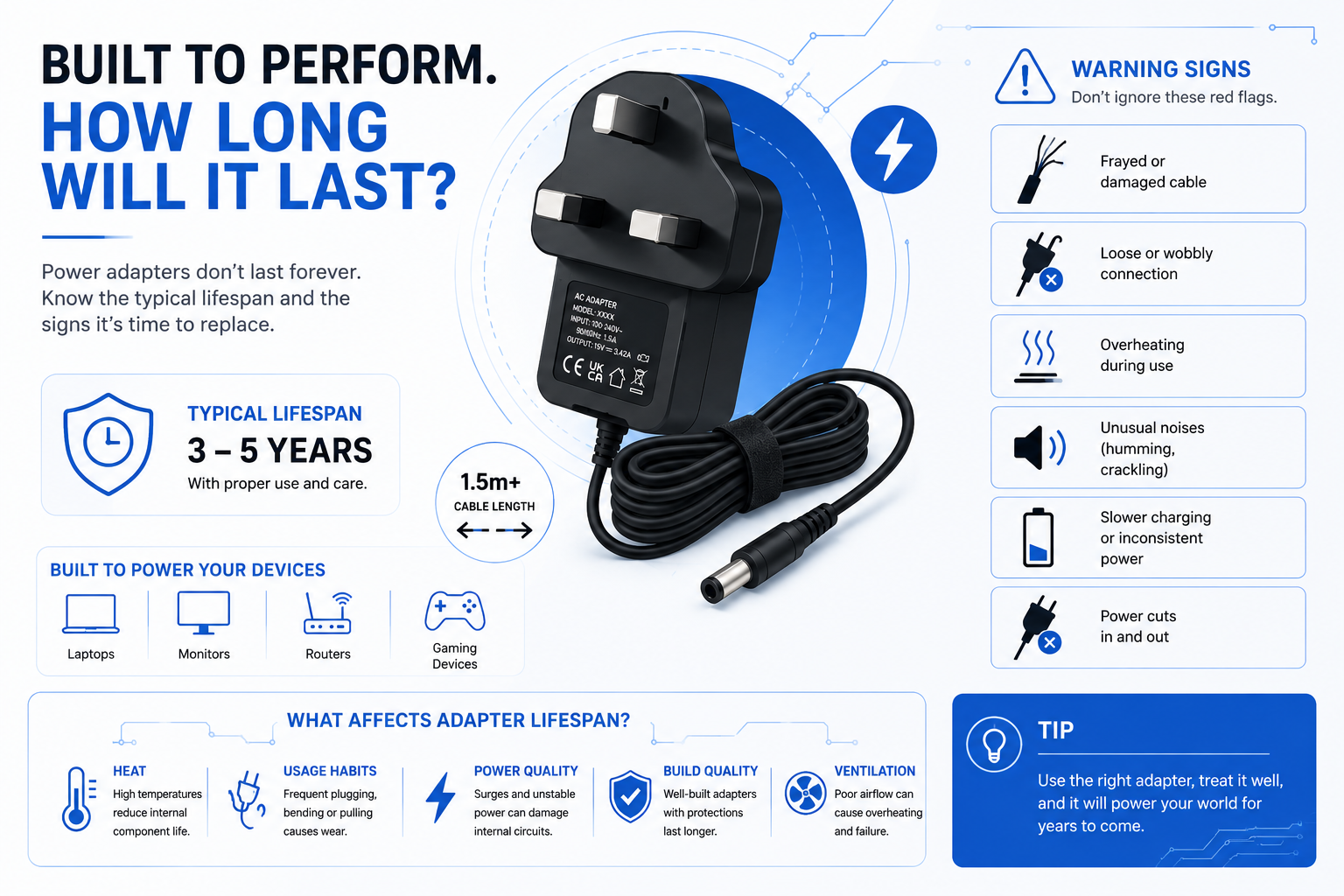
How long should a power adapter last? Understanding the lifespan of these devices is essential because we rarely think about our power adapters until they stop working. Tucked away under desks, behind entertainment centres, or tossed into travel bags, these modest plastic bricks are the unsung heroes of our daily technology setups. They quietly perform the complex job of dropping high-voltage household alternating current (AC) down into steady, low-voltage direct current (DC) required by your devices.
But like any hard-working electronic component, they do not last forever. Recognising the subtle indicators of failure early can protect your expensive hardware from sudden electrical damage.
Understanding the Power Supply Lifespan Expectancy
Under normal operating conditions, a high-quality consumer power adapter typically lasts between 3 to 5 years. Beyond this window, the internal components naturally degrade, reducing efficiency and increasing the risk of unstable voltage delivery.
While the external plastic shell of an adapter might look indestructible, the circuitry inside operates under strict physical and thermal limitations. Even if an older power brick appears to be charging your equipment, its internal safety features and voltage regulation capabilities gradually decline over time. Investing in a durable replacement power supply from a trusted UK distributor ensures that your hardware continues to receive pristine, tightly regulated power well past the lifespan of ageing stock chargers.
Why Power Bricks Fail and How Long Should a Power Adapter Last?
A power supply’s operational countdown is driven by a few main factors:
- Electrolytic Capacitor Drying: The lifespan of a power brick is tied directly to its internal capacitors, which are responsible for holding and smoothing electrical charges. Over years of use, the liquid electrolyte inside them slowly evaporates. In fact, an industry rule of thumb states that for every 10°C increase in internal operating temperature, the life expectancy of those capacitors is cut exactly in half.
- Copper Core Fatigue: The physical cable running from the brick to your device takes a heavy beating. Continual twisting, sharp bending, or wrapping the cable tightly around the housing causes microscopic fractures in the internal copper strands, leading to high electrical resistance and localised heat.
- Transformer Coil Insulation Breakdown: Inside the brick, copper coils are separated by incredibly thin layers of protective varnish. Years of expanding and contracting from daily heat cycles can cause this varnish to crack, creating internal short circuits that eventually ruin the adapter.
Summary: While external casing damage is easy to spot, the true lifespan limits of an adapter are dictated by hidden thermal wear and chemical drying inside the electronics.

The Dangers of Thermal Overload
Why does a charger brick get hot to the touch during normal use?
It is perfectly normal for an adapter to feel warm while actively converting electricity, but it should never feel hot enough to cause discomfort. If a power block becomes painfully hot to hold or emits a distinct, sweet smell of warm plastic, it means the internal circuits are overloading. Operating a severely overheating adapter creates a significant fire hazard and can send a destructive voltage spike directly into your connected hardware.
Protecting Your Main Hardware Investment from Ageing Adapters
Replacing an old or failing power adapter before it completely dies protects your main devices from permanent motherboard failure. An unstable power brick frequently suffers from “voltage sag” or sudden spikes that rapidly destroy delicate logic boards.
When an adapter reaches the end of its life, it loses its ability to filter out minor fluctuations coming from your home mains supply. This unfiltered power forces your connected devices to work much harder to regulate their own internal power, causing your routers, keyboards, or high-fidelity audio gear to run hot and fail prematurely.
Sourcing Model-Specific Power Replacements
When an ageing original power supply begins losing its efficiency or exhibiting signs of physical wear, replacing it promptly prevents destructive voltage drops from damaging your connected hardware:
- Home Network Infrastructure: Avoid sudden dropouts, random data packets dropping, or erratic router reboots caused by a failing, aged factory block by introducing a stable 12V mains Draytek Vigor 3200 router AC adaptor.
- Digital Musical Hardware: Eliminate problematic background ground loops, low-frequency hums, and unstable volume dynamics due to degraded internal audio filtering with a clean Casio Privia digital piano keyboard PX-350MBK 12V 1.5A power supply adapter.
- Desktop Label Printers: Prevent faint print passes, barcode pixelation, or hardware freezing caused by voltage sag under intense thermal printing workloads using a fresh 24V power adapter charger compatible for Dymo LabelWriter 450.
- Acoustic & Entertainment Gear: Protect delicate internal audio amplifiers from continuous thermal duress and messy AC line ripples with a robust compatible 12V power supply adapter charger for Bose SoundDock XT speakers.
Summary: Replacing an unstable or ageing adapter prevents expensive downstream equipment breakdowns, keeping your everyday electronics operating seamlessly.
Side-by-Side Comparison: Healthy vs. Dying Power Adapters
| Performance Indicators | Brand-New / Healthy Power Unit | Ageing or Dying Power Supply |
| Operating Temperature | Warm, stable, and completely comfortable to hold | Excessively hot, sometimes smelling of warm plastic |
| Acoustic Profile | Absolutely silent during operation | High-pitched coil whine, buzzing, or faint clicking |
| Power Delivery | Continuous, uncompromised stream of current | Intermittent connections; device drops power when cable moves |
| Device Performance | Device runs cool and operates at peak efficiency | Connected hardware runs hot or suffers random resets |
5 Critical Signs of a Dying Power Adapter
- High-Pitched Humming or Buzzing: High-quality power supplies operate at frequencies well above human hearing. If you can hear a distinct buzzing or clicking sound coming from the brick, it means the internal voltage regulation coils have vibrated loose or the capacitors are actively failing.
- The “Wiggle” Requirement: If your electronic gear only charges when you wiggle the cable or position it at a strict angle, the copper core inside the cable has snapped. Continuous arcing across this internal break creates intense heat that can melt the connector port.
- Visible Plastic Discolouration or Warping: If the exterior plastic housing shows dark spots, warping, or minor structural melting near the seams, the adapter has suffered a severe thermal event and must be unplugged immediately.
- Frayed Outer Sheathing: Cracked rubber insulation or exposed metal shielding braid near the stress-relief collars indicates severe structural fatigue, exposing users to electrical shock.
- Delayed Charging Responses: If your connected device takes several seconds to acknowledge it has been plugged in, or if it charges at a fraction of its normal speed, the power block can no longer output its rated amperage.

Why Quality-Minded Customers Choose Our Replacements
- Every replacement unit is built with precision voltage clamping to protect delicate downstream chipsets.
- Integrated thermal cutoff switches automatically shut down the unit if external ambient temperatures rise too high.
- Constructed from fire-retardant, impact-resistant polycarbonate shells for maximum physical protection.
- Strict compliance with international energy standards minimises phantom power draw when idle.
- All orders are shipped directly from our centralised UK fulfilment centre with dedicated customer care.
Power Supply Lifespan FAQ
Does leaving an adapter plugged into the wall shorten its lifespan?
Yes. Even if your device is disconnected or powered off, an adapter left in the wall socket still draws a tiny amount of “phantom current.” This keeps the internal circuitry under continuous electrical stress, accelerating component ageing.
Can a failing power supply destroy my connected electronics?
Absolutely. If the internal filtering capacitors fail completely, the adapter can pass a massive voltage spike or a messy AC ripple wave into your device, frying its main logic board instantly.
Is it safe to continue using a power adapter that makes a faint whistling sound?
No. A whistling or whining noise, which is often called “coil whine,” indicates that internal components are operating under abnormal electrical loads. This is a very common precursor to total adapter failure.
How can I make my desktop power adapter brick last longer?
Keep it off thick carpets, ensure it has plenty of ventilation, and avoid tightly wrapping the cable in sharp angles when storing it away.
Can I use a power adapter from a different device if the plug fits?
Not necessarily, and doing so can be dangerous. A matching plug does not guarantee identical electrical specifications. You must verify that the replacement adapter matches the exact voltage (V) requirements of your device and can deliver an equal or higher amperage (A). Using an adapter with the wrong voltage or reversed polarity can instantly destroy your hardware’s internal circuitry.
Conclusion
When assessing how long a power adapter should last, the 3-to-5-year mark is your golden standard. While it is tempting to squeeze every last drop of life out of a failing, buzzing, or patched power brick, the potential cost of a catastrophic hardware failure far outweighs the price of a simple upgrade. Choosing a certified, model-specific replacement from Power Adapter Warehouse ensures your valued home and office gear receives clean, dependable power from a unit designed with safety first. Protect your setup today by checking our comprehensive stock of certified replacement power supplies!