

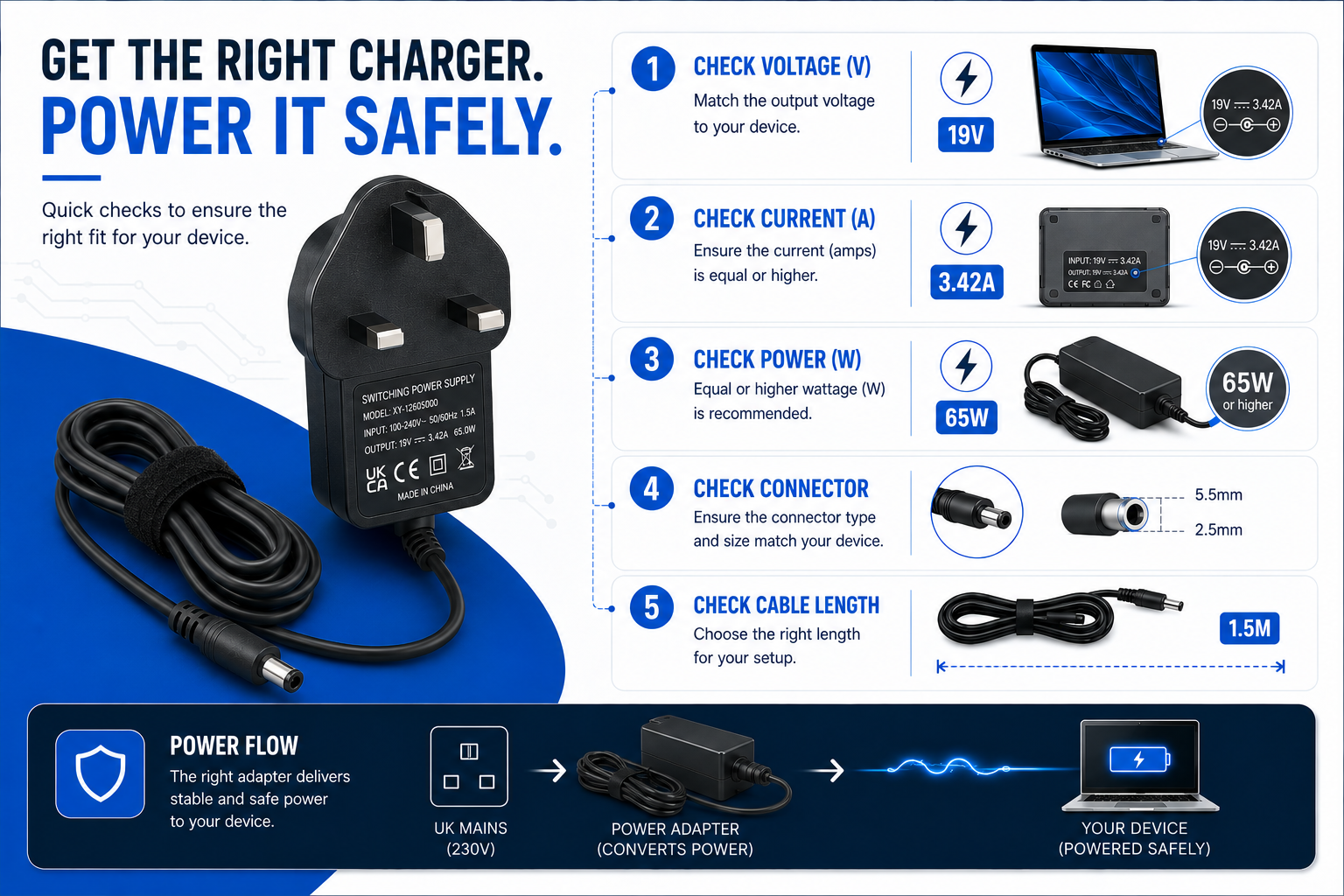
Navigating charger compatibility when looking for a replacement laptop, router, or TV adapter can feel like walking through a minefield. With thousands of options available online, picking the wrong power brick risks permanently destroying your expensive electronics. However, you don’t need an engineering degree to pick the perfect match.
The strategy focuses on matching your broken or lost hardware’s strict electrical profiles to high-quality, replacement units. By checking a few critical electrical numbers on your device’s label—Voltage, Amperage, Polarity, and Connector Type—you can safely bypass expensive brand-name replacements while avoiding electronic waste.

Step 1: Match the Voltage (V) Exactly
Always match the Voltage ($V$) of your replacement charger exactly to the device’s input specification. If your device requires a 12V input, you must use a 12V adapter. Failing to match voltage exactly will permanently ruin your hardware or cause it to short-circuit.
Detailed Explanation
Voltage measures electrical pressure. Your electronics are built with sensitive internal components engineered to handle a precise amount of electrical stress. If you use an adapter with a higher voltage than required, it overloads the components, leading to overheating, smoke, or a fried circuit board. Conversely, if the voltage is too low, the device won’t have enough power to boot or operate stable.
Examples & Real-World Application
Connecting an electronic accessory to a mismatched power supply turns a simple mistake into an expensive repair. For instance, plugging a 19V laptop brick into a 12V device will destroy its internal components instantly. On the other hand, matching a 12V hardware rail to a compatible 12v power adapter for technicolor talktalk android tv box provides flawless performance because the electrical pressure matches the system’s design parameters exactly.
Common Mistakes & Buying Advice
- Mistake: Assuming a charger is safe just because its barrel pin plugs neatly into the socket. Physical fit does not guarantee true charger compatibility!
- Buying Advice: Look for the “Input” section on your device’s base, or look for the “Output” section on your original charger’s label.
Myth vs Fact
- Myth: A 19V charger will charge a 12V device faster.
- Fact: It will fry the device immediately. Voltage must never be exceeded.
Step 2: Check the Amperage (A) and Wattage (W)
The replacement charger’s Amperage ($A$) must be equal to or greater than your device’s original current requirement. A device draws only the amount of current it needs; therefore, a charger with a higher amp rating will run safely, while a lower rating will cause the charger to overheat and fail.
Detailed Explanation
Think of amperage as the total amount of electric current available on tap. Your device determines how much current it pulls based on its real-time operational load. If your device needs 2A, it will pull exactly 2A, regardless of whether the charger can provide 2A, 3A, or 5A. However, if you plug in a 1A charger, your device will attempt to pull 2A from it, causing the power supply to work too hard, overheat, and eventually melt down.
When sourcing replacement units for networking hardware, for instance, using a premium aftermarket adapter with built-in current overhead protects your hardware from these performance drops. A popular example is utilising a compatible 12v mains draytek vigor router ac adaptor, which secures reliable charger compatibility so the connected system is never starved for power under heavy data loads.
Comparison Table: Amperage Matching Rules
| Device Requirement | Charger Output | Is it Safe? | Result |
| 12V, 2.0A | 12V, 2.0A | Yes | Perfect Match |
| 12V, 2.0A | 12V, 3.0A | Yes | Safe (Charger runs cooler) |
| 12V, 2.0A | 12V, 1.0A | No | Danger (Overheats & ruins charger) |
Step 3: Verify the Plug Polarity
You must match the connector polarity between your charger and your device. Most modern consumer gadgets use a Centre-Positive polarity configuration. Connecting a centre-positive device to a centre-negative adapter will instantly blow an internal fuse or permanently ruin the equipment.
Polarity Diagram Decoding
To check polarity, locate the small horizontal diagram stamped next to the voltage specification on the casing:
$$\Theta-\cdot-\oplus \quad \text{(Centre Positive)}$$
$$\oplus-\cdot-\Theta \quad \text{(Centre Negative)}$$
Buying Advice
95% of consumer electronic items like laptops and routers utilise centre-positive inputs. However, musical items (like effect pedals or old keyboards) frequently use centre-negative pins. Always verify this symbol on the hardware before finalizing your purchase.
Step 4: Measure the Physical Connector Pin Size
The physical barrel jack connector plug on your replacement charger must fit perfectly inside the device’s port. The dimensions are defined in millimetres, measuring both the Outer Diameter (OD) of the metal sleeve and the Inner Pin Diameter (ID) of the central hole. The most common standard size across consumer electronics is 5.5mm x 2.1mm.
Troubleshooting Common Fit Issues
If your replacement charger keeps disconnecting when moved, or won’t snap securely into place, you have an incorrect barrel jack size. For example, a 5.5mm x 2.5mm plug will technically fit into a 5.5mm x 2.1mm socket, but the internal contact pin won’t make tight contact with the sleeve. This results in loose connectivity, intermittent electrical arcs, and potential safety hazards.
Pre-Checked Solutions
Instead of guessing dimensions with calipers, searching by your device’s exact model identifier is the easiest way to ensure exact charger compatibility. For example, if replacing a portable display or display screen power adapter, look for dedicated builds like a compatible alba 22 inch led tv dvd combo power supply to bypass physical measuring entirely.
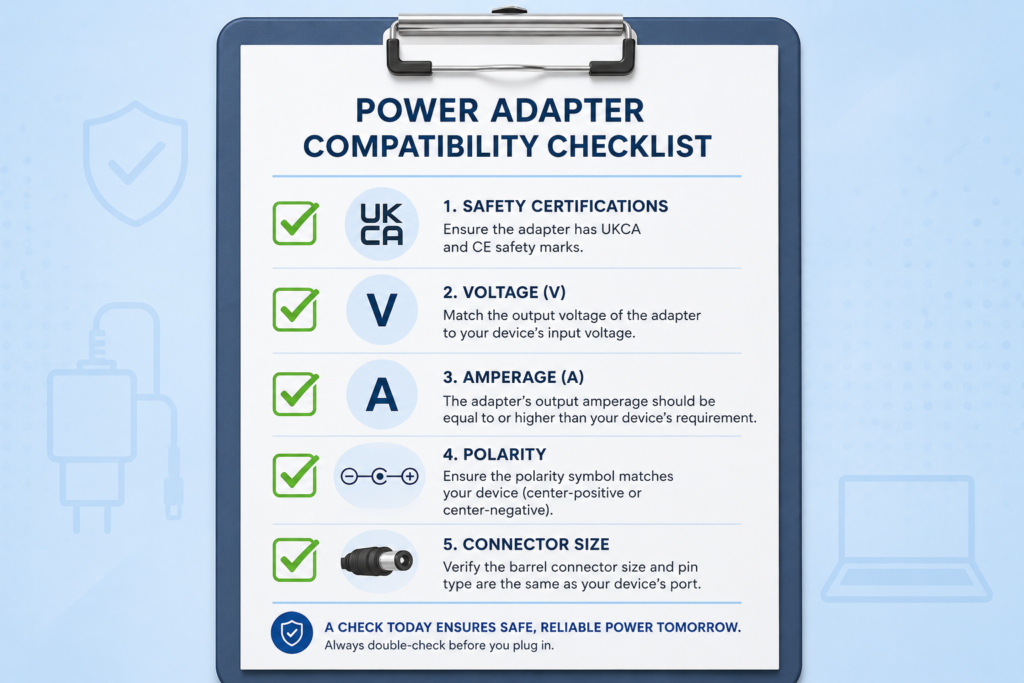
Charger Compatibility Checklist Summary
- Safety Marks: Carries verified CE and UKCA marks for domestic safety compliance.
- Voltage ($V$): Matches the device input perfectly.
- Amperage ($A$): Meets or exceeds the device input requirements.
- Polarity: Correctly matches (typically Centre-Positive $\Theta-\cdot-\oplus$).
- Connector Size: Fits securely without any wobbling.
FAQ Section
Can I use a charger with a higher wattage rating than my device requires?
Yes, it is entirely safe. Wattage is calculated as $\text{Voltage} \times \text{Amperage}$. As long as the voltage matches your device’s input exactly, a higher wattage rating simply means the charger has extra amperage capacity available. Your device will only draw what it needs, allowing the adapter to run cooler and last longer.
What happens if I use a cheap replacement charger that isn’t UKCA certified?
Non-certified chargers often cut corners on internal safety components to save on manufacturing costs. They lack critical engineering protections against short circuits, overcurrent, and thermal overloads. This increases the risk of frying your device’s motherboard or creating an electrical fire hazard in your home.
How do I find out my device’s power specifications if the sticker has rubbed off?
Look up the exact model number of your device online to find the manufacturer’s digital user manual, which always lists power requirements. Alternatively, you can browse specialised collections like the power adapter warehouse shop where exact charger compatibility is mapped out clearly by specific device model names..
Will a charger with lower amperage damage my electronic device?
While it usually won’t destroy the device immediately, it will stress the power adapter. The device will attempt to draw more current than the charger is built to supply. This causes the adapter to severely overheat, drop voltage stability, and eventually suffer hardware failure—potentially sending an electrical surge to your equipment when it breaks.
Can I use a centre-negative charger with a centre-positive device if the pin fits?
Absolutely not. If you match a centre-negative power supply to a centre-positive device, you reverse the electrical polarity. This causes current to flow backward through sensitive digital circuits, which will instantly blow an internal protection fuse or permanently melt the hardware’s internal electronic components.
Conclusion
Finding the correct replacement charger does not have to be a guessing game. By keeping the voltage identical, verifying that the current capacity (amperage) meets or exceeds requirements, and ensuring the plug size and polarity match, you can safely power any device. Investing in high-quality compatible adapters helps extend the life of your equipment and reduces electronic waste across the UK.
Ready to find your perfect match? Head over to the Power Adapter Warehouse Shop to find your exact device model and checkout safely today.