

19V Monitor Power Adapter: Best Replacement Guide

Finding a compatible 19V monitor power adapter seems simple, but picking a random brick can easily fry your display. When you see “19V” on the back panel, you are only looking at one piece of the puzzle. A completely compatible power supply must also provide enough current, feature the exact physical connector size, and use correct electrical polarity. Taking time to verify these specifications prevents major technical headaches and safety hazards.
What Does 19V Mean on a Monitor Power Adapter?
The “19V” label refers to Direct Current (DC) output voltage, which acts as electrical pressure. Getting this exact measurement right is absolutely critical for your display’s internal electronics.
If your monitor demands 19V DC, the replacement must deliver precisely 19V DC. Using a different output voltage causes operational failure, flickering displays, or permanent circuit board damage.
For example, a 12V supply will not provide enough pressure to boot up. Conversely, never assume a 19.5V laptop charger works just because it is close; small voltage increases cause severe overheating over time. Always inspect the input label before plugging anything into the wall.
How Many Amps Does a 19V Monitor Need?
The second critical specification is amperage, represented by an “A” on the rating label (such as 2A, 3A, or 4A). Unlike voltage, your replacement’s current rating does not need to match identically. The rule is simple: the replacement must provide at least as much current as the monitor requests.
If you are hunting for a 19V LG monitor power adapter and your screen specifies a power draw of 19V 2A, any of the following options will work perfectly:
- 19V 2A
- 19V 2.5A
- 19V 3A
- 19V 4A
Devices pull current on demand. The monitor only draws the 2A it requires to operate safely. However, an adapter rated below the requirement (like a 1A adapter for a 2A screen) runs at maximum capacity constantly, causing severe overheating or complete breakdown.
Can You Use a Higher-Amp 19V Monitor Power Adapter?
Yes, using a higher-amp supply is completely safe, provided the voltage, plug size, and polarity match.
If your display requires a 19V 2.1A LG monitor adapter, a 19V 3A unit works seamlessly. Higher amperage represents the maximum workload the brick safely handles—think of it as a safety ceiling rather than a constant push.

Understanding Wattage Requirements
Wattage indicates the total electrical power capacity of your setup. You can easily calculate wattage using a basic formula:
Voltage × Amperage = Wattage
Here is how that looks in real-world numbers across common 19V configurations:
- 19V × 2A = 38W
- 19V × 2.5A = 47.5W
- 19V × 3A = 57W
- 19V × 4.74A = 90W
If your screen requests 19V 2A, its maximum continuous draw is 38W. Utilising a 3A adapter provides a 57W ceiling, giving plenty of comfortable headroom to run cooler and last longer. However, wattage alone does not guarantee a fit if the barrel plug or polarity is incorrect.
Matching the Physical DC Plug Dimensions
Matching electrical figures is only half the battle. A replacement is useless if the DC plug does not physically fit into the power input port.
Most desktop screens utilise cylindrical DC barrel connectors, but dimensions vary widely. Watch out for:
- Outer Diameter (OD): The width of the metal cylinder’s exterior wall.
- Inner Diameter (ID): The width of the hollow space inside the tip, which fits over the centre pin.
A plug a fraction of a millimetre too large will not insert. One too small sits loosely, creating intermittent connection drops. Never force a tight or wobbly connector.
Verifying Adapter Polarity
Polarity is a make-or-break detail. Most DC supplies use a “centre-positive” structure, but assuming this can immediately ruin hardware. The label diagram features a central dot and outer ring connected to (+) or (-) symbols.
If the line from the centre dot leads to a plus sign, it is centre-positive. If it connects to a minus sign, it is centre-negative. Plugs act in reverse electrically; plugging a centre-negative brick into a centre-positive screen blows internal fuses instantly.
Can You Use a 19V Laptop Charger?
Not automatically. While many laptop chargers output 19V DC, they are not universally compatible with desktop monitors. Laptop bricks frequently feature different plug sizes, custom centre pins, and varied amperage.
Reuse a laptop charger only if every specification matches. For example, an MSI Optix 19V monitor adapter might share electrical properties with gaming laptops, but generic laptop chargers cause hardware failure if dimensions or polarities differ.
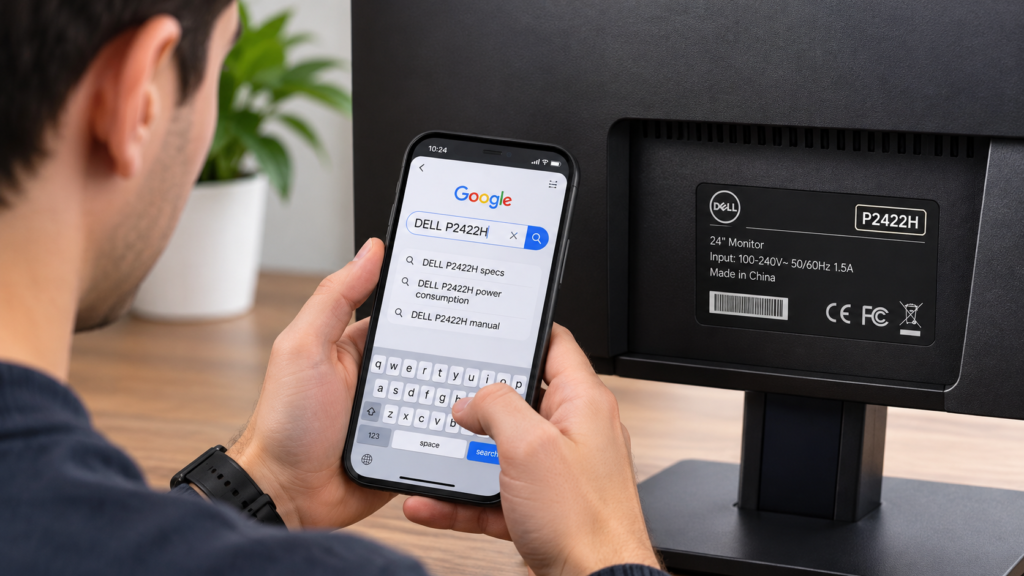
Practical Steps to Identify the Correct Adapter
- Inspect the Monitor Label: Check the back panel for values like “19V ⎓ 2.1A” and write them down before shopping.
- Search by Model Number: Look up your exact display model online. Searching for model-specific chargers, like a 19V AC-DC adapter for LG monitors, helps guarantee correct barrel size and current ratings.
- Verify the Diagram and Plug: Cross-reference plug dimensions against your input port and verify polarity symbols perfectly match. Centre-positive and centre-negative are never cross-compatible.
Common Mistakes to Avoid
- Settling for close voltages: Using 18V or 19.5V chargers under the assumption that a small difference does not matter.
- Under-powering the display: Choosing an adapter with lower amperage ratings than your monitor demands.
- Ignoring barrel plug measurements: Assuming all cylindrical DC power tips are a single standard size.
- Skipping polarity checks: Plugging in replacement bricks without checking the centre-positive diagram.
- Forcing bad connections: Pushing ill-fitting plugs into sensitive display inputs.
- Buying uncertified gear: Purchasing unbranded adapters that lack recognised electrical regulation marks, such as CE or UKCA marking guidance.
Quick Checklist Before Ordering
Before purchasing your new 19V replacement power brick or 19V 1.6A LG monitor power supply, run through this final checklist to ensure seamless operation:
- Voltage: Must measure exactly 19V DC.
- Amperage: Must be equal to or greater than the rating on the monitor.
- Wattage: Must meet or exceed total operational draw.
- Connector: Outer and inner barrel plug dimensions must match the port.
- Polarity: Centre-positive or centre-negative alignment must match the screen diagram.
- Safety Ratings: Verify that the supply meets regional safety standards and UK electrical safety guidance
.
Frequently Asked Questions
Can I use a 19V 3A adapter instead of a 19V 2A adapter?
Yes, as long as the connector size, polarity, and voltage match perfectly. The display will only pull the 2A it requires, leaving the remaining capacity as safe thermal headroom.
Can I use a 19V 1.5A adapter for a 19V 2A monitor?
No. Attempting to use a lower-amp supply leads to circuit overloading, severe overheating, unstable display behaviour, and premature power supply failure.
Is every 19V power brick compatible with LG monitors?
No. Manufacturers like LG utilise several different connector tip dimensions and current profiles across their product lineups. Always confirm exact model specs.
What should I do if I cannot find the amperage rating?
Consult your product user manual, search the manufacturer’s technical documentation online, or locate the original hardware listing for your monitor model.
What happens if I use an adapter with the wrong polarity?
Using the incorrect polarity will likely cause immediate hardware damage. It can instantly blow internal fuses or destroy the sensitive circuit boards inside your monitor.
Conclusion
Replacing a monitor adapter requires a careful match of electrical and physical specifications. Adhering to the exact 19V voltage, ensuring equal or greater amperage, and verifying plug dimensions and polarity protects hardware from irreversible damage. Cross-referencing these details guarantees safe, stable power for years to come, while managing equipment in line with UK electrical waste responsibilities.