

How to Find the Perfect Replacement Power Adapter

A faulty, damaged, or missing power adapter can quickly turn a perfectly functional device into an expensive paperweight. Whether you need a replacement for a laptop, router, CCTV system, monitor, games console, musical instrument, or other electronic equipment, choosing the wrong adapter can lead to poor performance, safety risks, or even permanent device damage.
Fortunately, finding the perfect replacement power adapter is easier than you might think. By checking a few key specifications, including voltage, amperage, connector size, and polarity, you can confidently select a compatible replacement that delivers reliable performance. This step-by-step guide explains exactly how to identify the right adapter and avoid common purchasing mistakes.
Step 1: Check the Voltage Rating
The first specification you should verify is the voltage rating, usually displayed as V on your existing adapter label.
Common voltage ratings include:
- 5V
- 9V
- 12V
- 15V
- 19V
- 24V
When purchasing a replacement adapter, the voltage must always match the original specification exactly.
For example:
Original Adapter Output: 19V DC
Replacement Adapter Output: 19V DC
If your device requires a 19V replacement power adapter, choosing the exact correct voltage ensures safe operation.
Using a lower voltage may prevent your device from functioning correctly, while a higher voltage can permanently damage internal components.
For devices requiring 19V output, ensure your chosen replacement perfectly matches the original specifications.
Devices operating on higher voltage requirements should only use a matching 24V compatible power adapter to avoid compatibility issues and electrical damage.
Why Voltage Matters
Voltage determines how much electrical pressure is supplied to your device. Even if the connector fits perfectly, the wrong voltage can create serious problems.
Always make voltage matching your first compatibility check when looking for the perfect replacement power adapter.
Step 2: Verify the Amperage Requirement
After confirming voltage, the next step is checking the amperage requirement.
Amperage is represented by:
- A (Amps)
- mA (Milliamps)
This specification indicates how much current the adapter can provide.
For example:
Original Adapter: 19V 3.42A
Replacement Adapter: 19V 4A
This replacement is generally suitable because the voltage matches and the adapter can safely provide additional current if required.
Important Amperage Rules
- Voltage must match exactly.
- Amperage can be equal or higher.
- Never choose a lower amperage rating.
Many people searching for a replacement power supply focus only on the connector’s appearance while overlooking amperage.
A quality 12V replacement power supply is a perfect example of how matching voltage and sufficient amperage ensures stable and reliable performance.
Selecting the correct amperage helps prevent overheating, instability, and premature adapter failure.
Step 3: Identify the Connector Size
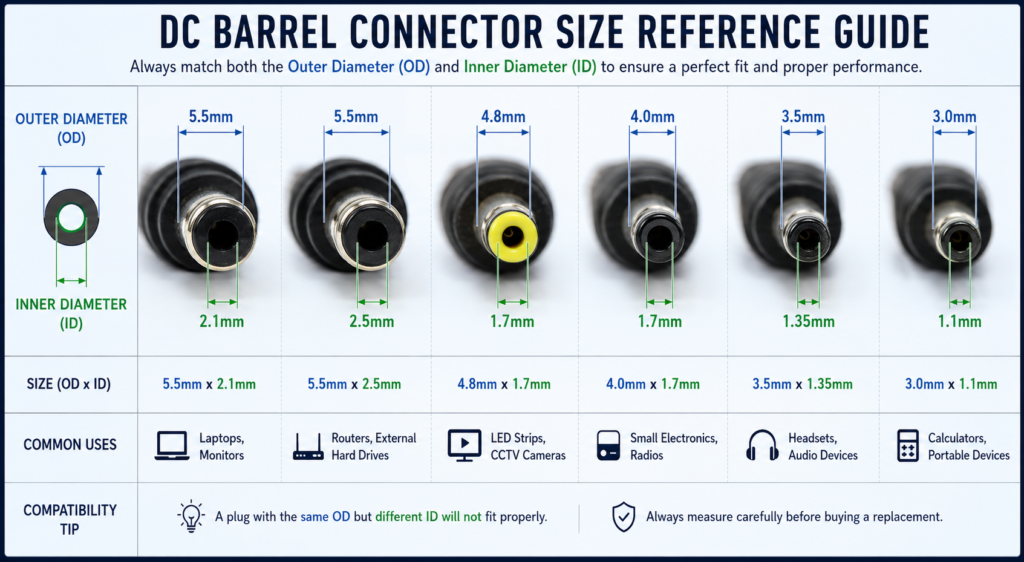
One of the most common reasons replacement adapters are returned is incorrect connector size.
Even when voltage and amperage are correct, the adapter will not work if the connector does not fit your device.
Common DC barrel connector sizes include:
- 5.5mm x 2.1mm
- 5.5mm x 2.5mm
- 4.0mm x 1.7mm
- 3.5mm x 1.35mm
How to Check Connector Size
- Review the original adapter specifications.
- Check the device manual.
- Measure the connector manually.
- Compare your measurements with the product descriptions online.
Many of these common sizes are available within our range of replacement adapters with 5.5mm connector options.
Common Connector Mistakes
- Assuming connectors that look similar are identical.
- Ignoring internal pin diameter.
- Purchasing “universal” adapters without verifying that your specific tip is included.
Connector size verification is a critical step in any adapter compatibility guide.
Step 4: Confirm the Polarity
Polarity determines how electrical current flows through the connector.
Most modern electronics use:
Centre Positive Polarity
You can usually find polarity information printed on:
- The adapter label
- Device documentation
- Product specifications
Why Polarity Is Important
Using the wrong polarity can:
- Prevent the device from powering on
- Damage internal circuits
- Reduce equipment lifespan
Fortunately, most replacement adapters clearly indicate polarity information to help customers choose correctly.
Whenever possible, compare the polarity symbol on the replacement adapter with your original power supply.
Step 5: Check the Device Model Number
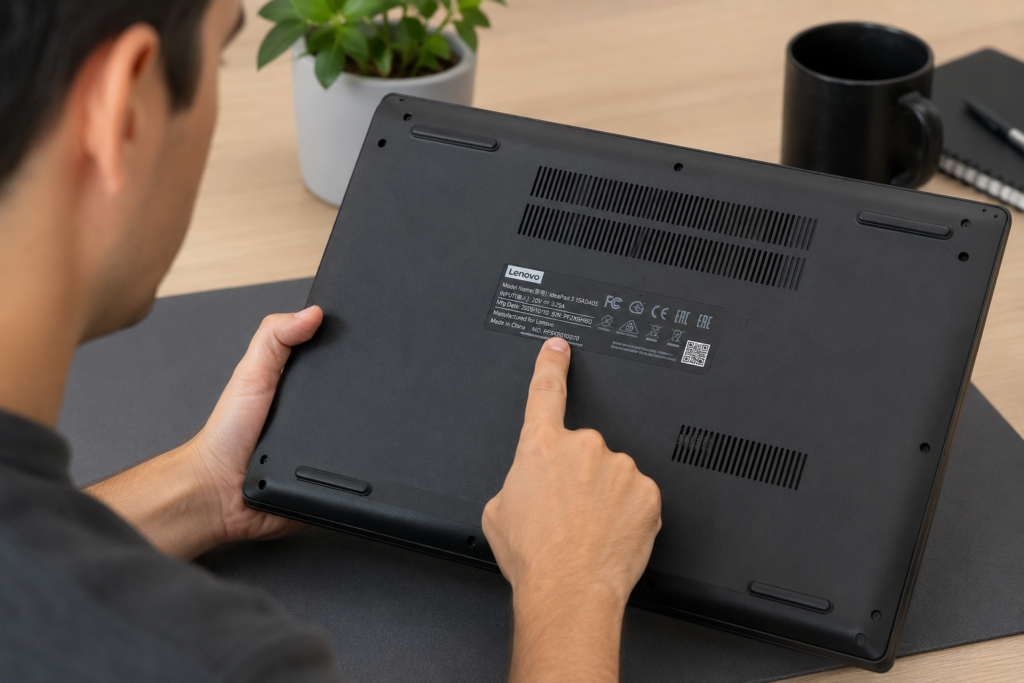
If you are uncertain about voltage, amperage, or connector size, the device model number can often provide the quickest solution.
Model numbers are commonly located:
- Underneath laptops
- On router labels
- On monitor backs
- Inside battery compartments
- On manufacturer identification stickers
Searching by model number can help identify compatible replacement products and reduce the risk of ordering the wrong adapter.
This approach is particularly useful for older electronics where original adapters may no longer be available.
By combining model number verification with voltage and connector checks, you significantly improve your chances of finding the perfect replacement power adapter the first time.
Step 6: Choose a Reliable Compatible Replacement
Not all replacement adapters offer the same level of quality.
A dependable compatible power adapter should include:
- Stable voltage output
- Short-circuit protection
- Over-voltage protection
- Over-current protection
- UK safety compliance
- Durable construction
A reliable 15V universal power adapter is a great example of a replacement designed to provide safe and consistent performance across multiple compatible devices.
What to Look For in a Quality Adapter
- Accurate specifications
- Safety certifications
- Good customer reviews
- UK-compatible plug design
- Clear compatibility information
Choosing a reputable supplier helps ensure you receive a safe and dependable replacement.
Why a Compatible Replacement Adapter Makes Sense
A quality compatible replacement adapter can offer several benefits:
- Lower cost than original branded chargers
- Reliable everyday performance
- Availability for discontinued devices
- Reduced electronic waste
- Faster replacement options
Instead of replacing an entire device because of a failed charger, many consumers choose compatible replacement power adapters that provide the same functionality at a more affordable price.
This approach helps extend the life of valuable electronics while reducing unnecessary spending.
Whether you need a laptop charger replacement, router adapter, monitor power supply, or universal power adapter, selecting the correct specifications remains the key to success.
Frequently Asked Questions
Can I use a higher amperage power adapter?
Yes. A higher amperage rating is perfectly acceptable provided the voltage matches exactly and the connector fits. Your device will only draw the current it needs.
Can I use a higher voltage adapter?
No. Voltage should always match the original adapter specification exactly to prevent frying your device.
How can I identify my connector size?
You can check the original adapter label, consult your device manual, or measure the connector’s outer and inner dimensions manually using callipers.
What happens if I use the wrong power adapter?
Using an incorrect adapter may cause poor performance, overheating, device malfunction, or permanent damage.
Are compatible replacement adapters safe?
Yes. High-quality compatible replacement adapters that meet UK safety standards are designed for safe and reliable operation.
Conclusion
Finding the perfect replacement power adapter does not need to be complicated. By checking voltage, amperage, connector size, polarity, and device model information, you can confidently select a compatible replacement that delivers safe and reliable performance.
A replacement power supply is often a cost-effective way to extend the lifespan of laptops, routers, CCTV systems, monitors, gaming equipment, and many other electronics.
Ready to find the right adapter for your device? Browse our range of replacement power adapters and choose a compatible solution with confidence today.