

Keyboard Powers On Then Shuts Down? Causes & Proven Fixes
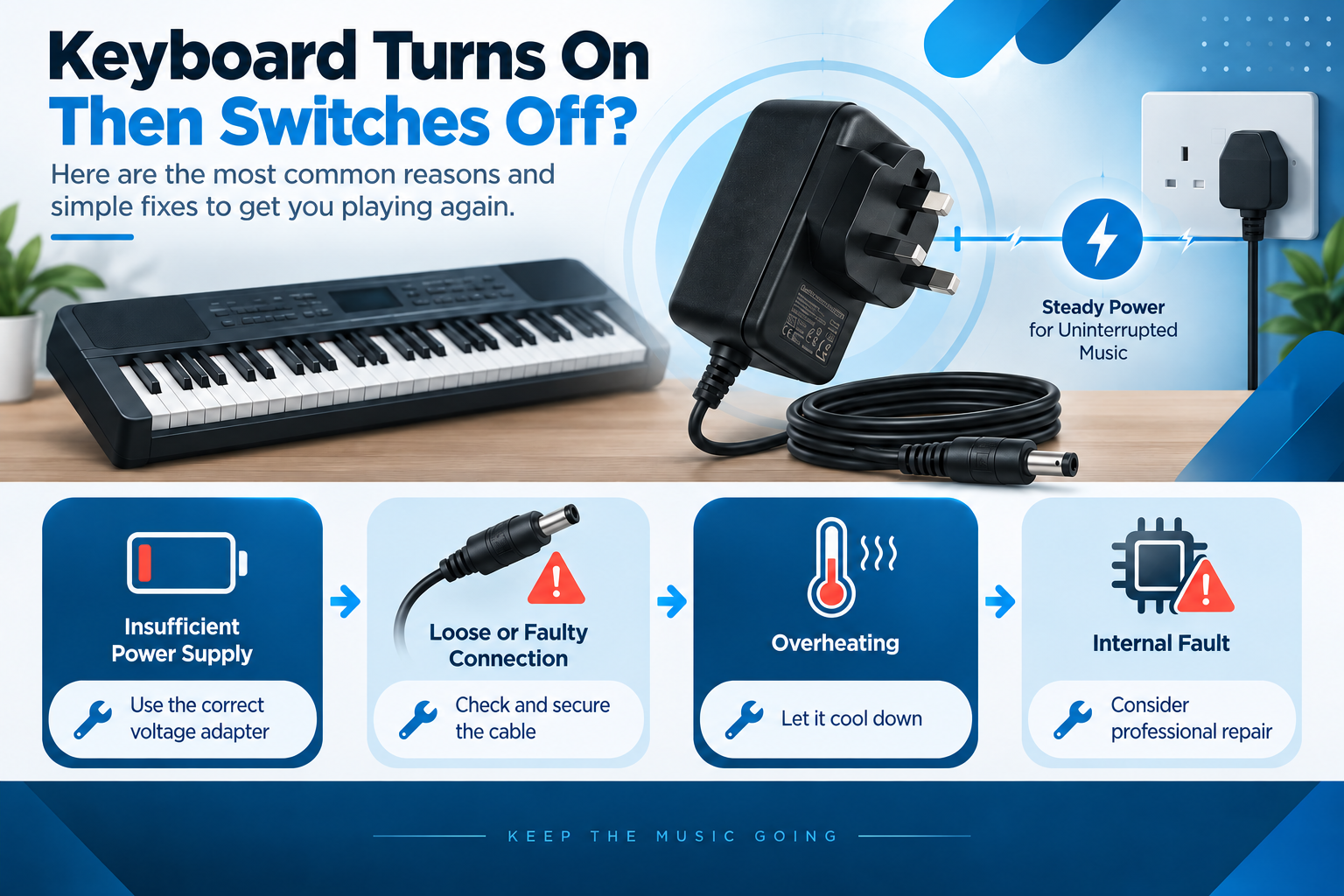
When an instrument switches on and immediately turns off, it is a common issue that often points to a problem with its power adapter, lead, connector, battery, overheating protection or internal electronics. In many cases, the instrument receives power briefly but cannot maintain a stable supply. Before replacing the keyboard or adapter, check the power source and the adapter specifications.
Could the Power Adapter Be the Reason Your Keyboard Powers On Then Shuts Down?
Yes. A failing power adapter is one of the first things to check when a keyboard switches on and then suddenly turns off.
An adapter can develop internal faults as components age or after prolonged exposure to heat, a phenomenon well-documented in standard electrotechnical terminology. It may provide enough power during start-up but become unstable once the keyboard begins drawing more current.
If the adapter becomes excessively hot or shows signs of damage, disconnect it and stop using it; in such cases, replacing it with a specific model like a Compatible Replacement for 15V 3A AC-DC Adapter for JDA1503000DM3 for Easy Karoke EKS878-BT is often the safest solution.
Does the Keyboard Need More Current Than the Adapter Provides?
It can. Every power adapter has a maximum current capacity. If the keyboard requires more current than the adapter can reliably provide, the supply may become unstable or shut down.
For example, a 15V 2A adapter has a rated capacity of:
15V × 2A = 30W
A compatible 15V 3A adapter provides up to 45W of rated output capacity, while upgrading to a Compatible 15V 4000mA 4A AC-DC Switching Adapter Power Supply FJ-SW1504000-UK for Replacement provides even more headroom. A higher current rating does not force those extra amps into the keyboard. The keyboard draws the current it needs when the voltage and other specifications are suitable.
However, do not use a higher-amp adapter simply because the keyboard keeps shutting down. Voltage, polarity, connector size and output type must also match.
Can Incorrect Voltage Cause a Keyboard to Shut Down?
Yes. The voltage must match the keyboard’s specified input.
Using a supply with insufficient voltage can prevent the instrument from operating correctly. A supply with excessive voltage can potentially damage electronic components.
Check the original adapter label, the keyboard’s input marking or the manufacturer’s specification. If the required voltage cannot be confirmed, do not guess.
Could a Loose or Damaged DC Connector Cause Intermittent Power?
Absolutely. A loose DC plug, damaged socket or broken lead conductor can interrupt power when the keyboard is moved or the lead is disturbed.
Inspect the lead carefully, particularly near both ends and around the strain relief. Look for cuts, exposed wiring, crushed sections or unusual bending.
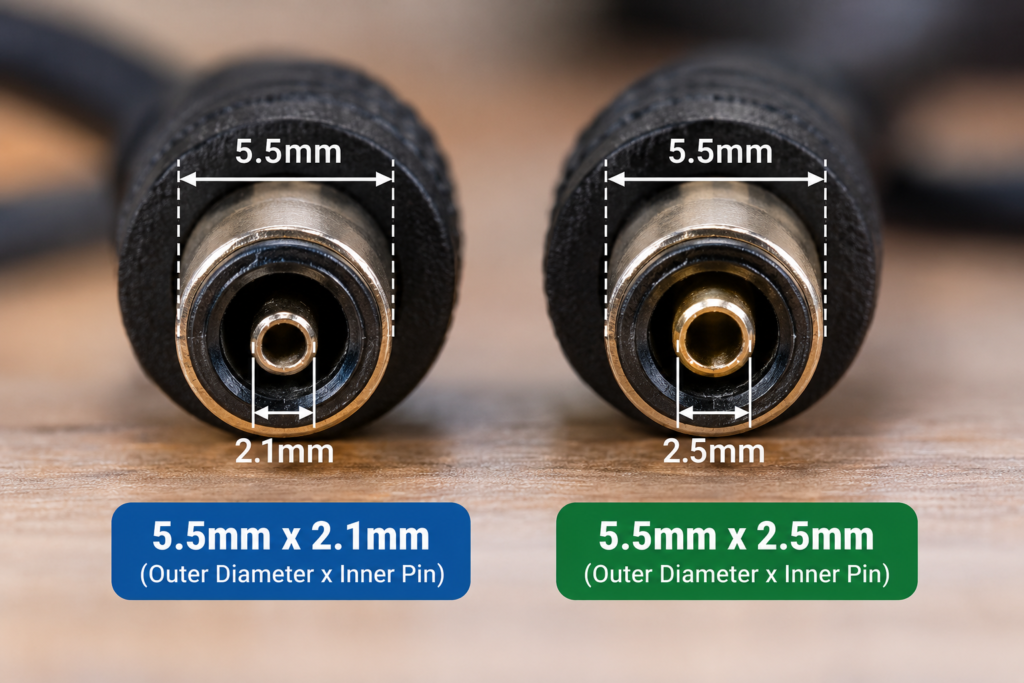
The connector must also be the correct size. Barrel connectors can look almost identical while having different internal dimensions, which is why it is critical to know whether your instrument requires a Compatible 2A 2000mA AC-DC Switch Mode Adapter Power Supply PSU 5.5mmx2.1mm for 15V or a visually similar Compatible 2A 2000mA AC-DC Switching Adaptor Charger Power Supply 5.5mmx2.5mm for 15V.
Never force a plug into the keyboard. A connector that fits loosely may also cause intermittent operation.
Why a Keyboard Powers On Then Shuts Down After Running for a While
If the keyboard works normally at first and then shuts down, overheating becomes an important possibility.
Power adapters and electronic equipment naturally produce some heat. Excessive heat, however, can cause protective shutdowns or indicate an underlying fault.
Check whether the adapter is covered, positioned in a poorly ventilated area or operating under a heavy load. The keyboard itself can also overheat if ventilation is blocked or an internal component is failing.
How Do You Tell If the Keyboard or Adapter Is Faulty?
Confirm that the mains socket works and that the adapter is connected securely. Inspect the lead and DC connector, then check the keyboard’s power input for visible damage.
If you have another adapter available, do not connect it merely because its plug fits. Compare its voltage, current, output type, polarity and connector specification first.
If suitable test equipment is available, a competent person can measure the adapter’s output voltage. An unstable output may indicate failure.
If the adapter tests normal, the problem may be inside the instrument.
Can a Higher-Amp Adapter Stop the Keyboard From Shutting Down?
It can, but only when insufficient current capacity is actually the problem and every other specification matches.
Suppose a keyboard requires 15V 2A. A compatible 15V 3A adapter can generally provide greater current capacity. This does not mean the keyboard receives a forced 3A.
Never assume that a 15V 3A adapter is automatically safe for every keyboard. Confirm the exact model and complete electrical specification first.
What Happens If You Use the Wrong Keyboard Power Adapter?
Insufficient current can cause instability, shutdowns or excessive adapter heating. Incorrect voltage can cause poor operation or potentially damage the keyboard. As outlined by official UK electrical safety guidance, incorrect polarity can create a serious electrical fault.
A connector fitting physically is not enough to prove compatibility.
If the keyboard starts shutting down after a replacement adapter is connected, stop using the supply and check its specifications.
How to Choose the Correct Replacement Keyboard Adapter
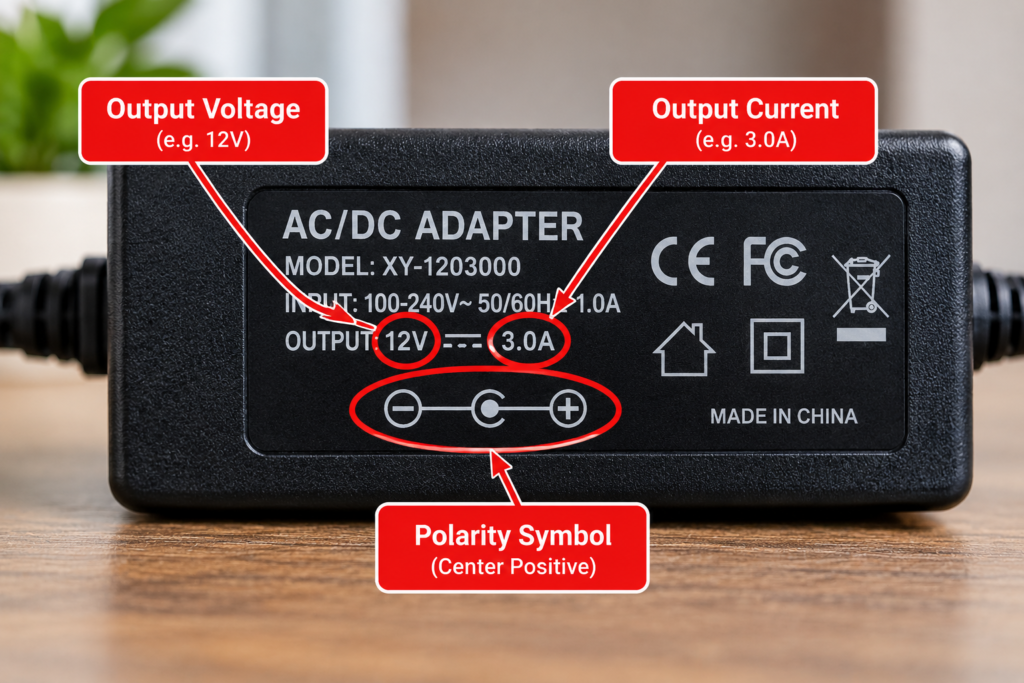
Use the keyboard model number as your primary reference, such as looking for a Replacement Power Adapter 15V Compatible for Kawai CN29 CN35 CN37 CN39 Digital Piano Power Supply if you own those specific models. Then compare the original adapter and device specifications to ensure they meet the latest UK product safety guidance standards.
Check:
- Output voltage
- Current requirement
- AC or DC output
- Connector size
- Polarity
- Original adapter part number
- Keyboard model
- UK mains plug requirements
Keyboard Power Troubleshooting Checklist
Before ordering a replacement, check:
- Does the mains socket work?
- Is the adapter securely connected?
- Is the lead damaged?
- Is the DC connector loose?
- Does the adapter become unusually hot?
- Does the keyboard shut down after warming up?
- Is the adapter’s voltage correct?
- Is the current capacity sufficient?
- Does the connector size match?
- Is the polarity correct?
- Does the replacement match the keyboard model?
If you find exposed wiring, severe overheating, burning smells or other obvious damage, stop using the equipment.
Frequently Asked Questions
What should I check if my keyboard powers on then shuts down?
The common causes include a failing power adapter, insufficient current capacity, incorrect voltage, damaged lead, loose connector, overheating or an internal keyboard fault.
Can a bad adapter make a keyboard shut down?
Yes. A failing adapter may provide power during start-up but become unstable when the keyboard begins drawing more current.
Can I use a higher-amp adapter?
Usually, yes, when the voltage, connector, polarity, output type and other requirements match.
Why does my keyboard shut down after several minutes?
Overheating, an adapter fault, excessive load or an internal electronic problem can cause delayed shutdowns.
How do I find the right keyboard adapter?
Check the exact keyboard model and original adapter. Match voltage, current, output type, connector size and polarity before connecting a replacement.
Conclusion
A keyboard that powers on and then shuts down may have a failing adapter, insufficient current capacity, damaged lead or connector, overheating problem or internal fault.
Start by checking the mains socket, adapter, lead and keyboard power input. Then verify the complete adapter specification rather than relying on connector fit alone.
If the keyboard requires 15V 2A, for example, a compatible 15V 3A adapter can generally provide additional current capacity, provided the connector, polarity, output type and other specifications match.