

Replacement 12V Power Adapter for an Old Router: Finding the Perfect Match
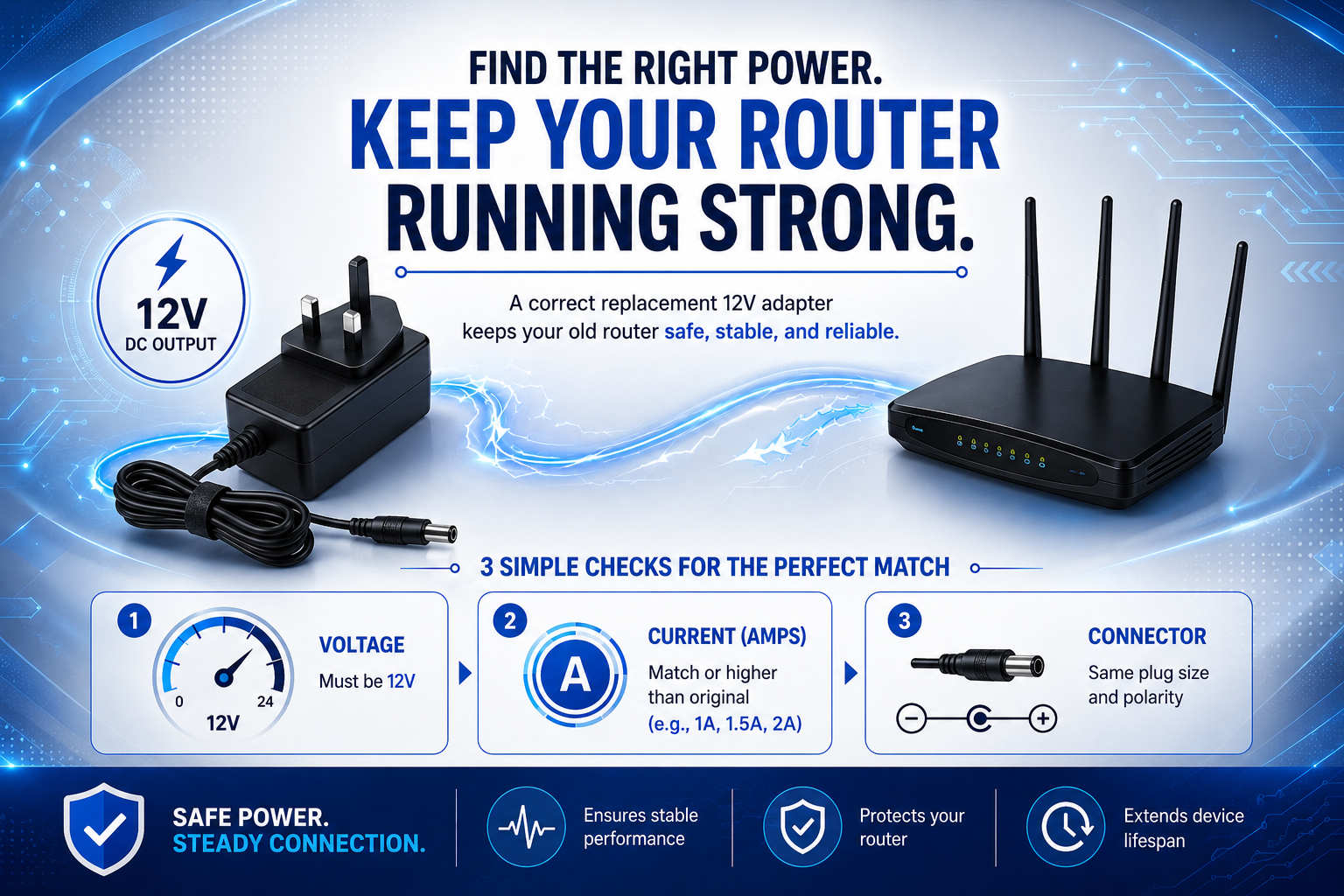
Finding a replacement 12V power adapter for an old router can be more difficult than it first appears. The router may still work perfectly, but its original adapter could be damaged, missing or no longer available.
Searching for “12V router adapter” can bring up dozens of similar-looking products. However, 12V is only one part of the specification. You also need to confirm the current rating, DC connector, polarity and router model.
Start With the Old Router’s Model Number
The exact router model is the best starting point. Check the label on the bottom, rear or side of the router for its model number, product number or exact name.
This matters because manufacturers often release several routers that look similar but use different power supplies. Searching for the complete model number can also help you find an old manual, archived specifications or a model-specific replacement adapter, such as a 12V DrayTek Vigor 2700G/2710 router adapter.
What If the Original Adapter Is Missing?
If the original adapter has disappeared, do not try to identify the replacement by looking only at the router’s power socket.
Use the exact router model to find its original power requirements. You can then compare those requirements with current replacement products.
For example, a model-specific 12V power adapter for the TP-Link Archer D2 router gives you a more specific starting point than a generic 12V adapter listing.
Use the Old Adapter’s Label as Your Reference
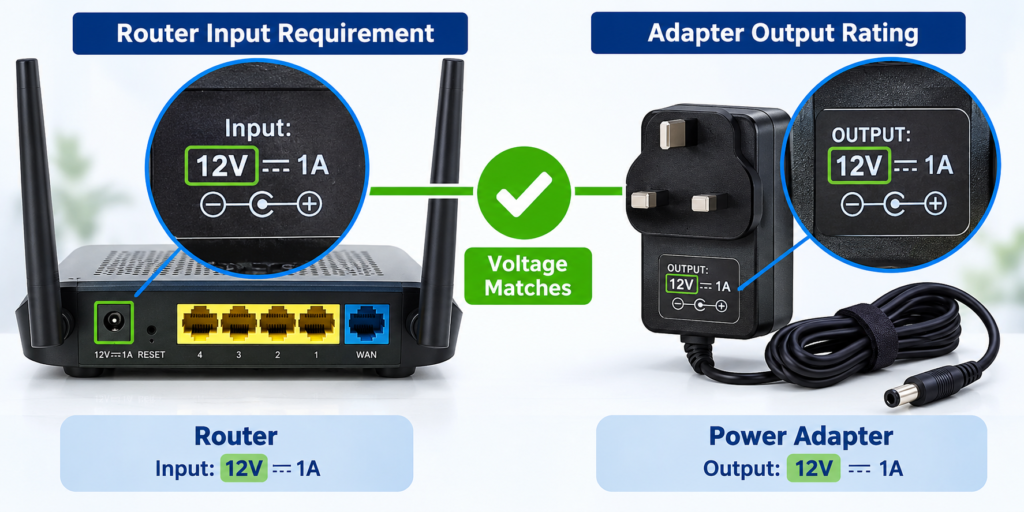
If you still have the old adapter, its label can save you a lot of guesswork. Look for the output information, which may show something such as “OUTPUT: 12V DC 1A”.
Keep the old adapter nearby while comparing replacement listings. Check its output information against the new adapter and use the connector as a physical reference.
Do not assume that a replacement is correct just because the label looks similar. The complete specification still needs to match the router.
Check the Voltage
The replacement voltage needs to match the router’s required voltage.
If the router requires 12V DC, look for a replacement that provides 12V DC output. Do not choose a different voltage simply because the connector fits.
Voltage is one of the most important specifications to verify before connecting a replacement adapter.
Match the Current Rating
Next, check the current rating. You may see adapters marked 12V 1A, 12V 2A or 12V 3A.
The amp rating describes the amount of current the adapter can supply. A replacement with sufficient or greater current capacity can generally work when the voltage and other specifications match.
For example, a router requiring 12V 1A may be suitable for a compatible 12V 2A adapter. A 12V 1A adapter would not be suitable for a router that requires 12V 2A because it has less available capacity.
Identify the Correct DC Connector
The DC connector is another part that is easy to overlook.
Many older routers use round barrel plugs, but these connectors are available in different sizes. Two plugs can look almost identical while having different dimensions.
If you still have the original adapter, compare its connector with the replacement specification. If it is missing, use the router model to identify the correct connector size.
A 12V replacement power adapter for the D-Link DWR-921 router is an example of a model-specific product that can also give you a useful reference when checking compatibility.
Never force a connector into the router. If it does not fit naturally, stop and check the specification.
Check the Polarity
Polarity needs to match as well. The polarity symbol on an adapter shows how the positive and negative connections are arranged at the DC connector.
Centre-positive is common on many consumer routers, but you should not assume that every router uses it.
A connector can fit physically and still have the wrong polarity. Check the old adapter label, router documentation or reliable model information before connecting a replacement.
Finding Information for a Discontinued Router
An old router may no longer have an active product page on the manufacturer’s website. That does not necessarily mean you cannot find its power requirements.
Search using the complete model number together with terms such as “power adapter”, “power supply” or “12V adapter”.
Older manuals, retailer specifications and specialist replacement listings may provide useful information.
Provider-supplied routers can be particularly useful examples. A 12V Virgin Media SuperHub router power adapter shows how using the exact router name can narrow down the replacement search.
Compare details from reliable sources rather than relying on a marketplace listing that only gives a voltage.
Compare the Replacement Listing With Your Router
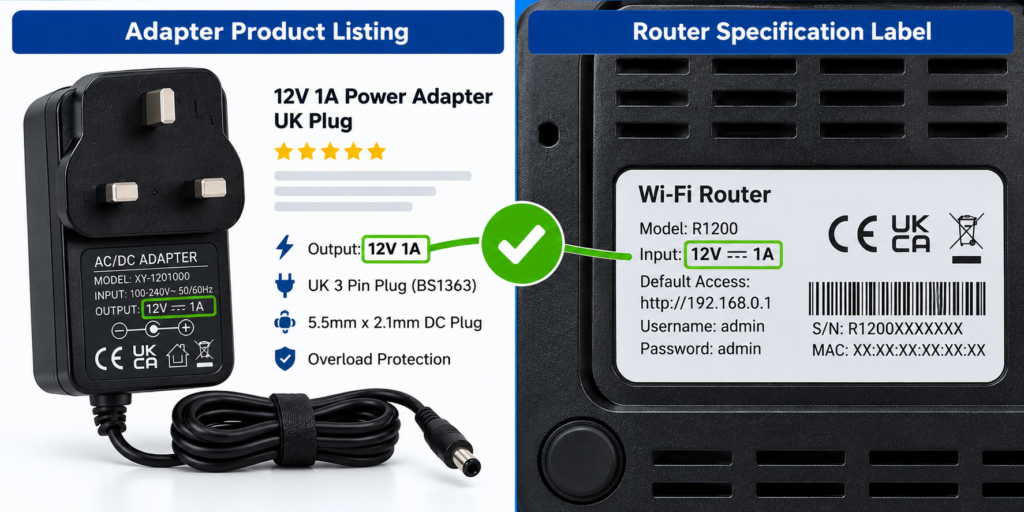
Once you know the router’s requirements, compare them directly with the replacement listing.
Check the router model, voltage, current rating, connector, polarity and stated compatibility.
For example, if you have a TalkTalk HG633 Super Router, you can compare its requirements with a compatible 12V 2A AC-DC power supply for the TalkTalk HG633 Super Router.
A model-specific listing gives you a clearer starting point than a generic product title. If the listing does not provide enough information to verify compatibility, it is better to keep looking than to guess.
Be Careful With Universal Adapters
Universal adapters can seem convenient when the original power supply is no longer available. However, having several interchangeable tips does not automatically make an adapter suitable for an old router.
You still need to confirm the voltage, current capacity, connector and polarity, as well as the correct tip and settings.
For UK buyers, you can also review UKCA marking guidance when considering product information and UK marking requirements.
5 Things to Check Before You Buy a 12V Power Adapter for an Old Router
Before ordering a replacement 12V adapter, check these five points:
- Router model – Is the exact model identified?
- Voltage – Does the replacement provide the required 12V output?
- Current – Does it have enough available capacity?
- Connector – Is the DC plug the correct type and size?
- Polarity – Does it match the router?
If these details match, you have a much stronger basis for choosing a replacement.
FAQs
Can I use any 12V adapter with an old router?
No. The voltage, current capacity, connector and polarity all need to be suitable for the router.
What if I cannot find the original power adapter?
Use the exact router model to identify its original power requirements, then compare those specifications with current replacement listings.
Can I use a newer adapter with an older router?
Yes, provided the replacement matches the router’s voltage, current requirements, connector and polarity.
Can a higher-amp adapter work with an old router?
It can generally work when the voltage and other compatibility requirements match. A higher current rating provides greater available capacity.
Do I need to replace the router if its adapter fails?
Not necessarily. If the router still works properly and meets your needs, replacing the faulty adapter may be enough.
Conclusion
Finding a replacement 12V power adapter for an old router starts with identifying the router, not simply searching for “12V adapter”.
Find the exact model number, use the old adapter’s label if you still have it, and confirm the voltage, current, connector and polarity.
If the router has been discontinued, model-specific searches and older documentation can help you find the information needed to compare replacement products.
The safest approach is to match the complete specification. A replacement that says 12V is not automatically the right adapter for your router.