


Modern gaming hardware demands raw, uninterrupted power to drive high-performance processors, vivid panels, and immersive audio systems. When an original power brick breaks or gets misplaced, finding an instant fix becomes a top priority. However, purchasing an unverified, generic universal charger can result in severe system bottlenecks, component overheating, or permanent motherboard failure. Finding dependable replacement chargers for gaming devices requires a clear understanding of your hardware’s exact electrical blueprint. This comprehensive guide walks you through navigating voltage, matching amperage, and identifying exact connections so you can get back into the game safely and affordably.
Technical Specifications: The Core Power Pillars of Chargers for Gaming Devices
To select a functional replacement charger, you must ensure the output voltage (V) matches your device’s input requirement exactly. The amperage (A) rating of the replacement must be equal to or higher than the original specification, and the structural shape of the connector tip must plug into your device securely without forcing.
To find these requirements, you simply need to take a look at the target device input specifications, which are usually printed on a small sticker on the bottom or back of your hardware. This label breaks down the power needs into two vital metrics: Voltage and Amperage. While the incoming Voltage must match your hardware’s native requirements exactly to prevent damage, the Amperage operates under a different rule — it must simply equal or exceed the original value, allowing your device to safely draw only what it needs.
Deciphering Voltage, Amperage, and Wattage
Voltage represents the electrical pressure entering your gaming platform. If your laptop requests a 19.5V input, delivering too much pressure can cook surface-mounted capacitors, while supplying too little can cause instant system failure. Amperage is the flow rate of the electricity; your device only draws what it needs, making a higher amperage rating perfectly safe. Multiplying these two metrics yields total Wattage ( V x A = W ).
Practical Application: Calculating Laptop Demands
Consider a performance laptop that lists an input criteria of 19.5V and 11.8A on its baseline sticker. Multiplying these together means your system draws up to 230 Watts under peak rendering loads. If you connect an adapter rated for 19.5V and 12.3A, the laptop operates flawlessly because it safely caps the draw at its native 11.8A.
Critical Safety Risks & Common Mistakes
The single biggest misstep is choosing an adapter based solely on whether the connector tip physically slides into the jack. Many consumer brands use matching physical barrel configurations but implement entirely reversed polarities or lack internal surge filtering logic. Buying a cheap, unbranded alternative exposes your machine to voltage ripples that cause screen flickering or premature component degradation.
Summary
Never guess your power configuration; always extract raw metrics directly from your device label before finalizing an alternative choice.

Polarity Rules
What is Centre Positive Polarity?
Most modern gaming electronics rely on a “Centre Positive” barrel architecture, where the internal pin carries the positive charge and the outer sleeve serves as the negative ground. Connecting a centre-negative plug to a centre-positive port causes a catastrophic short circuit unless the charger features an integrated reverse-polarity protection circuit.
Powering Peripherals: Monitors, Handhelds, and Audio Seats
Gaming monitors, mobile handheld consoles, and specialised gaming chairs require dedicated, well-filtered power outputs to prevent visual artefacts and audio buzzing. Replacing these blocks requires sourcing specific adapters built to clean electrical tolerances rather than using cheap, general-purpose utility bricks.
Understanding how electricity impacts performance is simple once you look at how different bricks handle a heavy workload. For example, using an unregulated, low-quality adapter causes the voltage to drop sharply under heavy load, which directly triggers frustrating issues like screen flickering and speaker buzzing. On the other hand, a certified replacement maintains a completely flat, stable power line, ensuring you get crisp visuals and clear sound throughout your session.
Ensuring Visual and Audio Signal Fidelity
High-refresh-rate gaming panels pull an intense, fluctuating load whenever the display transitions between bright and dark scenes. If the adapter lacks clean voltage regulation, you will experience visible screen tearing or backlight flickering. Audio-integrated gaming furniture experiences similar issues, where low-grade adapters leak electrical noise directly into the subwoofers.
Practical Use Case: Restoring Peripheral Performance
If your display starts blacking out during intense gameplay loops, the existing power brick is likely dropping voltage under load. Upgrading your display to a dedicated MSI Optix gaming monitor power supply cord immediately stabilises the delivery. Similarly, resolving audio dropouts or structural feedback in multimedia seating can be achieved by utilising a clean X Rocker Olympus gaming chair adapter, which isolates the power feed to eliminate background hums.
Avoiding Substandard Power Connections
Avoid choosing multi-voltage “sliding switch” generic plugs. These consumer switches easily get bumped into the wrong position, accidentally sending 24V into a delicate 12V device. Additionally, look for solutions tailored specifically to your ecosystem, such as an alternative X Rocker Evo Pro power adapter or an inline PlayStation VR headset power charger to maintain stable system continuity.
Summary
Match your peripheral’s unique demands with dedicated compatibility solutions to preserve your immersion and protect your gear.
Comparison Table: Original Branded vs. Certified Compatible Adapters
| Feature Criteria | Original Manufactured Power Supply | Power Adapter Warehouse Solution |
| Voltage Calibration | Exact Factory Specification | Exact Factory Specification |
| Safety Certification | CE / UKCA Mark Standard | CE / UKCA Mark Standard |
| Circuit Protection | Thermal & Short Circuit Shielding | Thermal & Short Circuit Shielding |
| UK Customer Support | Often Restricted or Discontinued | Full Dedicated Support Fleet |
| Average Cost Profile | High Premium Brand Markup | Highly Economical & Eco-Friendly |
Troubleshooting Guide: Identifying Power Supply Failure
- Symptom: Battery drains while plugged in. Your adapter’s wattage output is lower than your laptop’s operational draw. The machine is forced to pull supplemental energy from the internal battery.
- Symptom: High-pitched whining noise (coil whine). The internal transformers inside the brick are degrading or overloaded. Disconnect the plug immediately to prevent thermal failure.
- Symptom: Screen drops signal intermittently. The peripheral adapter cannot handle sudden power shifts during intense visual render sequences.
- Symptom: Excessive brick heat. The adapter is under-specced or lacks proper ventilation. Ensure your replacement meets or exceeds the original amperage.
Myth vs. Fact Analysis
- Myth:Using an adapter with a higher amperage rating will instantly blow up my console.
- Fact: Hardware only pulls the current it requires. Amperage is a capacity rating, not a forced delivery metric.
- Myth:All Type-C power blocks deliver identical charging rates.
- Fact: High-draw gaming gear relies on explicit negotiation profiles governed by established USB-IF Power Delivery protocols. Simple smartphone bricks will not trigger fast-charging parameters on devices like the Steam Deck.
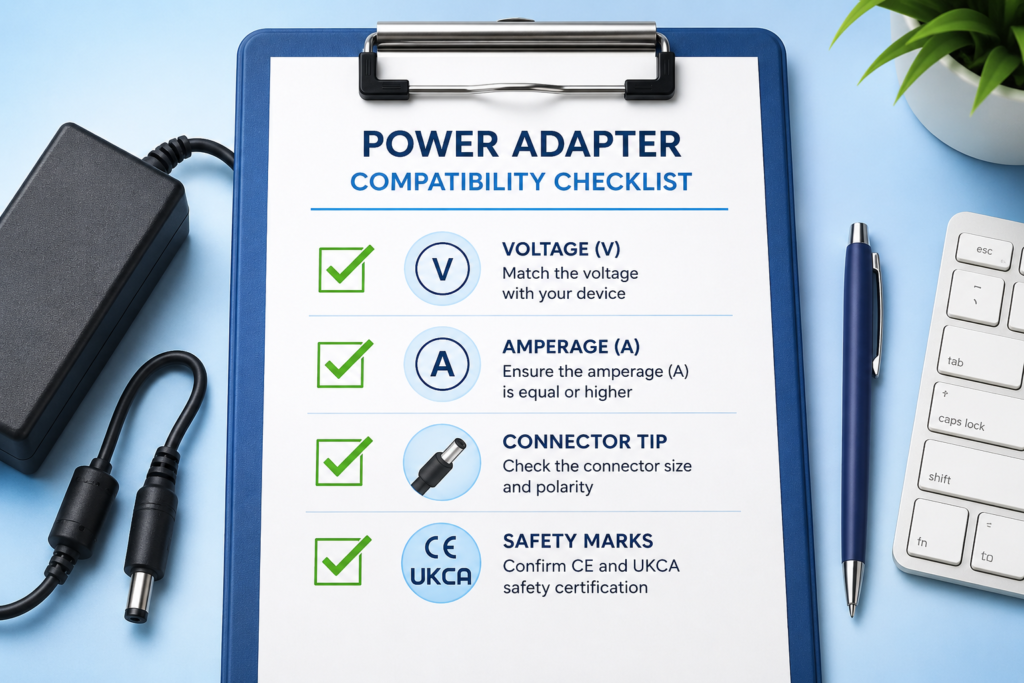
Hardware Sourcing Checklist
- The target voltage matches your device’s input requirements exactly.
- The current amperage meets or exceeds your device’s requirements.
- The physical connector matches your device’s input port dimensions.
- The tip polarity matches your device’s requirements (typically Centre Positive).
- The unit features fully verified CE and UKCA safety standard stamps.
FAQs
Can I safely use an alternative charger with higher wattage on my laptop?
Yes. Wattage capacity indicates total available power. A device only draws what its internal power management controller requests. A higher-wattage brick will run cooler and display an extended lifespan.
Why does my generic universal power brick get dangerously hot when gaming?
Generic adapters often lack specialised internal thermal sinks and use sub-par internal components. Under heavy gaming loads, these units operate at maximum capacity, generating excess heat that can degrade performance.
What electrical safety marks should I look for when purchasing a replacement in the UK?
Ensure any alternative adapter features prominent UKCA and CE marks. These stamps guarantee the power supply has passed strict electrical safety inspections regarding over-voltage, short-circuiting, and thermal regulation.
Will an incorrect replacement adapter void my device’s warranty?
Using an uncertified power adapter that delivers improper voltage can void a manufacturer’s warranty if it causes over-voltage damage. Choosing a certified, precisely matched compatible adapter completely removes this risk.
How can I accurately find the model number of my missing power cord?
Look directly at the bottom or back casing of your device for a section labelled “Input.” Note down the exact model number, voltage, and current configuration to find a matching product on our site.
Conclusion
Investing in high-performance gaming gear requires protecting that investment with clean, stable power. Choosing the right compatible alternative lets you avoid branded markups while keeping your system performing at its peak. Ready to restore your system’s performance? Shop our full line of compatible replacement adapters today.